AFRY
Digital Material Library
Context
Project Overview
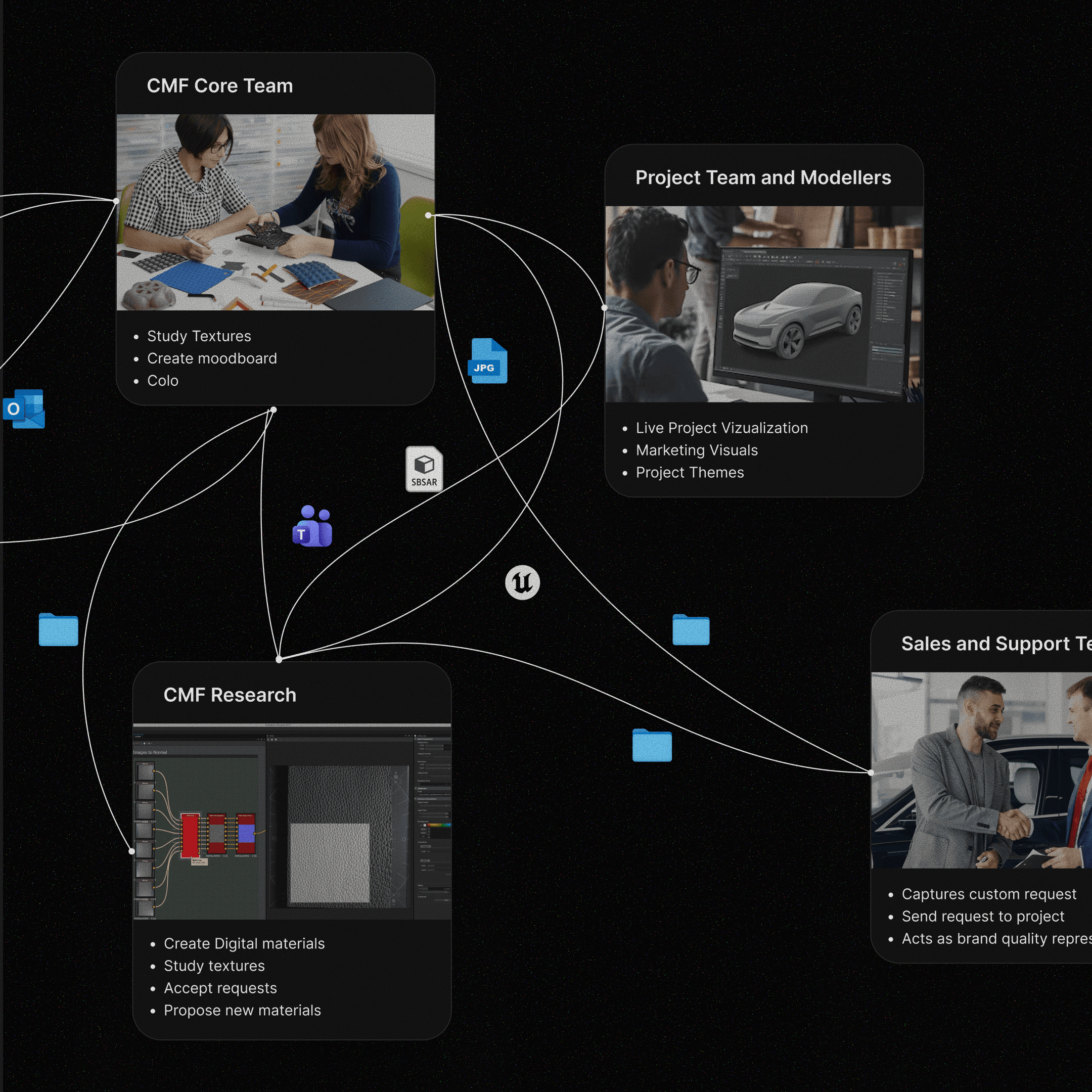
An iconic automotive client under NDA was struggling with how scanned materials moved across their teams. DML is the asset management platform I designed to fix that, handling high volumes of materials across multiple stakeholders, from inbound processing and storage to tracking and distribution.
As founding designer, I built the entire design system from scratch using Gen AI at its foundation. The platform was designed as a white-label solution and fully customizable across different automotive brands. The goal was simple: one centralized system where every user has clear visibility into assets and their status, with no fragmented workflows.
Scope of work
UX/UI Design
Interaction Design
Product Strategy
Year
2025-2026
Problem
While the system had to serve multiple stakeholders and act as a single source of truth, the internal workflow holding it together was fragile. This caused delays in handling, distributing, and keeping teams aligned. On top of that, it needed to be scalable and adaptable enough to function as a plug-and-play platform across different automotive brands, adding significant complexity to the design system.
Solution
A centralized platform for asset management that transforms complex data and uploads into publishable content through automation, while providing users with confidence, control, transparency, and seamless content lifecycle management. A system that could be deployed across different brands without rebuilding from scratch.

01
Project Goals
Key UX Objectives
Streamline asset creation to improve workflow efficiency.
Enable seamless content discovery and intuitive navigation.
Apply progressive disclosure to support efficient admin review.
Provide transparent versioning and content traceability.
Ensure a consistent experience across web and Hub platforms.
02
Layout and Component Design
Grid System
I designed a grid system built for scalability and consistent information architecture, defaulting to 2560x1440 to match the team's standard desktop setup. The layout accommodates standard HD screens while providing a reusable framework for future pages.

AI-Bootstrapped UI library
With no existing design system and tight timelines, I used Generative AI tool to bootstrap the UI component library giving us a solid foundation to build from without starting from scratch. This saved hours of time which was used to focus on refining the UX.
Core components and scalability
Every new UI decision started with the existing token and component library. Reuse was the default. New additions only when a clear gap existed. This kept the product consistent as it scaled. System changes moved to weekly Design and Dev syncs, replacing scattered messages and last-minute calls. Every update was evaluated for impact before it shipped for development.
Asset Cards
Search bar
Sort and Filter
03
Key UX Decisions
Automating repetitive uploads
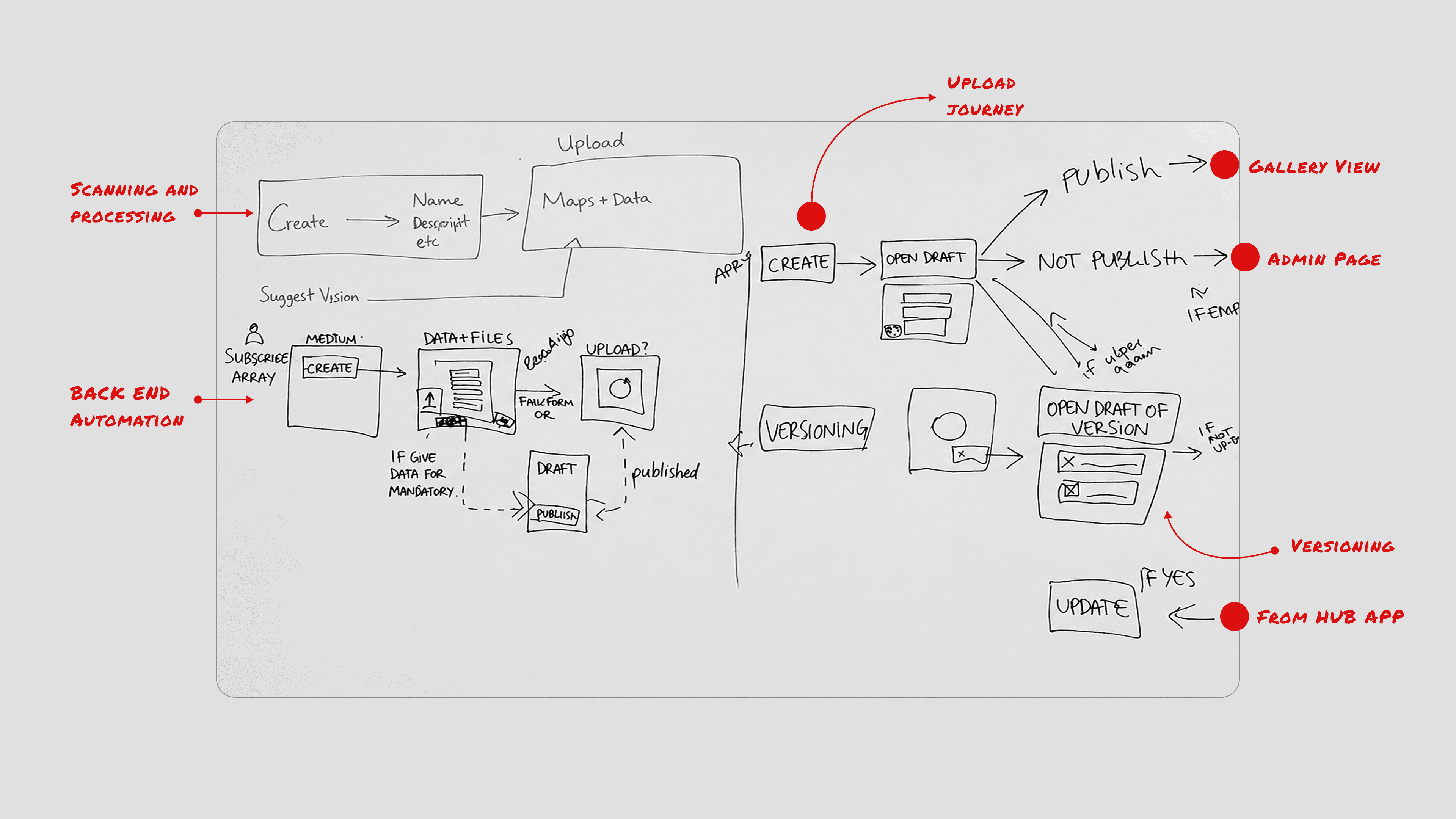
A redesigned upload flow around a standardized naming convention that auto-populates form fields on upload. Mandatory field validation and instant error flagging blocks incomplete submissions. This reduced human error and sped up the upload process.

Organizing asset properties
Details and actions reveal only when needed, keeping the interface clean and reducing cognitive load without hiding critical functionality.
Separating Work in Progress
A dedicated Drafts section kept unfinished assets out of the main library, visible only to the team actively working on them. This prevented incomplete files from being downloaded and gave the CMF team a clean, separate space to work without disrupting the wider workflow.

Putting Permissions in the Right Hands
Stakeholder research revealed that client teams needed ownership over their own permission structures. We focussed on establishing an admin role with full control over user rights, governing who could upload, modify, or categorize assets. Every change was logged for traceability, and assets only appeared in the library after admin approval.